
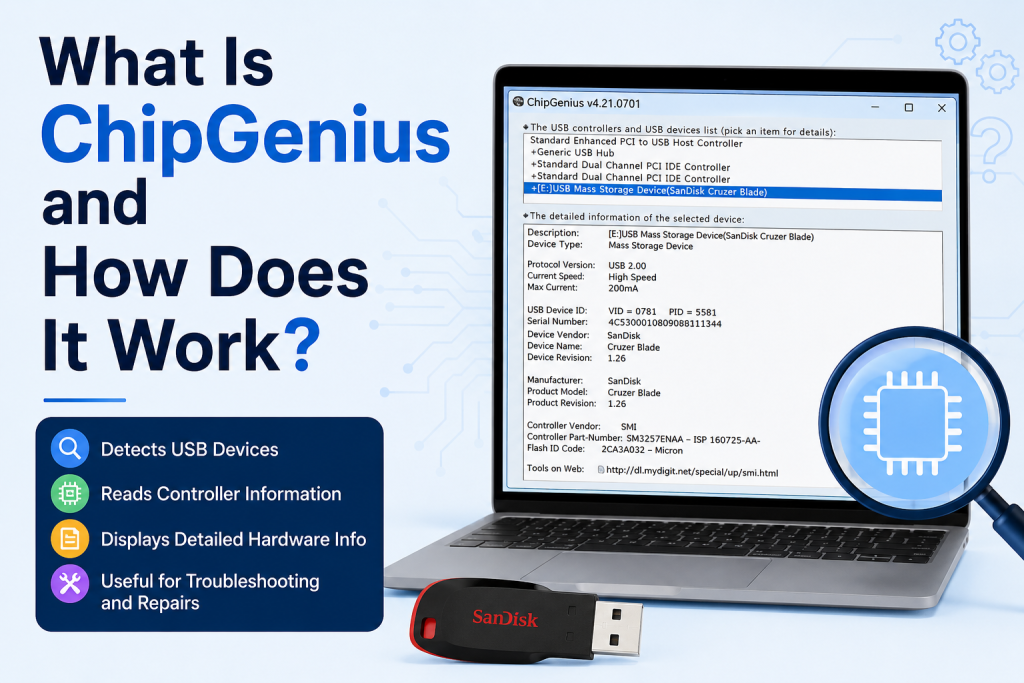
USB flash drives are among the most commonly used storage devices today. Whether you use them for transferring files, creating bootable drives, or backing up important data, understanding the hardware inside your USB device can sometimes be necessary. This is where ChipGenius becomes a valuable tool.
ChipGenius is a lightweight utility designed to identify detailed information about USB devices, especially flash drives. It helps users discover the controller chip model, manufacturer details, vendor IDs, product IDs, and other technical specifications that are not easily visible through Windows Device Manager.
What Is ChipGenius?
ChipGenius is a free Windows-based software application that scans connected USB devices and displays technical information about their internal components. The tool is particularly popular among technicians and advanced users who need to repair, diagnose, or restore malfunctioning USB flash drives.
Unlike standard system tools that provide only basic information, ChipGenius digs deeper into the hardware level. It identifies the USB controller chip used inside the device, which is essential when searching for compatible firmware or repair utilities.
The software does not modify your USB drive or write data to it. Its primary function is to detect and report information about the device.
Why Do People Use ChipGenius?
There are several situations where ChipGenius can be useful:
- Identifying the exact controller chip inside a USB drive.
- Finding the correct firmware tools for repairing a damaged flash drive.
- Verifying the authenticity of a USB device.
- Troubleshooting USB recognition issues.
- Gathering hardware details before attempting data recovery.
- Helping technicians diagnose hardware-related problems.
Because many USB drives look identical externally, ChipGenius provides insight into the components hidden inside the device.
How Does ChipGenius Work?
ChipGenius works by communicating with the USB devices connected to your computer. When launched, the software scans the USB ports and retrieves hardware identification information directly from the device controllers.
The program reads data such as:
- Vendor ID (VID)
- Product ID (PID)
- Device revision number
- Manufacturer information
- Controller chip model
- Flash memory details
- Serial numbers, when available
After collecting this information, ChipGenius displays it in a structured format that users can analyze.
The tool does not require installation. Most versions run as portable applications, allowing users to launch the program immediately after downloading it.
Key Features of ChipGenius
Detailed USB Device Identification
One of ChipGenius’s strongest features is its ability to identify the exact controller used in a USB flash drive. This information is often critical when searching for repair utilities.
Portable and Lightweight
ChipGenius is a small application that does not consume significant system resources. Since it typically runs without installation, it is convenient for technicians who work on multiple computers.
Support for Multiple USB Devices
The software can detect various USB-connected devices, including flash drives, card readers, external storage devices, and other peripherals.
User-Friendly Interface
Despite presenting technical information, ChipGenius uses a straightforward interface. Connected devices are listed on one side, while detailed information appears in the main window.
Helpful for Firmware Research
If a USB drive becomes corrupted, users often need the controller model to locate appropriate firmware recovery tools. ChipGenius simplifies this process by identifying the hardware accurately.
Information Displayed by ChipGenius
When scanning a USB device, ChipGenius may provide information such as:
Device Description
This includes the name of the connected USB device recognized by the system.
Device Type
The software identifies whether the hardware is a flash drive, storage controller, card reader, or another USB device.
Vendor ID (VID)
The Vendor ID identifies the company responsible for manufacturing the USB controller.
Product ID (PID)
The Product ID distinguishes the specific device model produced by the manufacturer.
Controller Part Number
Perhaps the most valuable detail, the controller part number helps users locate compatible repair tools and firmware updates.
Flash Memory Information
In some cases, ChipGenius can detect details about the NAND flash memory used within the device.
How to Use ChipGenius
Using ChipGenius is relatively simple.
First, connect the USB device you want to analyze to your computer. Next, launch the ChipGenius application. The program automatically scans connected USB hardware and lists detected devices.
Select the desired device from the list to view detailed information. You can then review the displayed specifications and, if necessary, copy the data for future reference.
The entire process generally takes only a few seconds.
Is ChipGenius Safe to Use?
ChipGenius itself is considered a diagnostic tool rather than a repair application. Since it primarily reads hardware information, it does not alter files stored on the USB drive.
However, users should always download software from trusted sources. Additionally, if you plan to use the information obtained from ChipGenius to flash firmware or repair a drive, proceed cautiously. Using incorrect repair utilities may permanently damage the device.
Creating backups of important data before attempting any repair process is strongly recommended.
Advantages of ChipGenius
ChipGenius offers several benefits:
- Provides detailed USB hardware information.
- Helps identify controller chips accurately.
- Supports a wide range of USB devices.
- Portable and easy to use.
- Useful for troubleshooting and diagnostics.
- Assists in locating compatible recovery tools.
These advantages make it a valuable resource for both professionals and experienced computer users.
Limitations of ChipGenius
Although useful, ChipGenius does have certain limitations.
It is primarily designed for Windows systems and may not function on other operating systems. Additionally, the software focuses on identification rather than repair. Users seeking to fix damaged drives may need additional tools after gathering hardware information.
Some newer USB devices may also provide limited details depending on their controller design and security restrictions.
Who Should Use ChipGenius?
ChipGenius can benefit several types of users.
Computer repair technicians often use it when diagnosing USB drive issues. Data recovery specialists may rely on it to identify controller hardware before selecting recovery methods.
Advanced users interested in learning more about their storage devices can also find the software educational and practical.
For casual users who simply transfer files, ChipGenius may not be necessary unless troubleshooting becomes required.
Common Use Cases
ChipGenius is frequently used for:
- Identifying unknown USB controller chips.
- Preparing for USB firmware restoration.
- Investigating counterfeit flash drives.
- Diagnosing USB devices that fail to function properly.
- Collecting technical details for support forums or repair guides.
Its ability to reveal hidden hardware information makes it especially valuable in technical environments.
Conclusion
ChipGenius is a powerful diagnostic utility that helps users uncover detailed information about USB flash drives and other USB devices. By identifying controller chips, vendor information, and hardware specifications, it plays an important role in troubleshooting, repair preparation, and device verification.
While the software itself does not repair damaged drives, it provides the critical information needed to choose the right tools and procedures. For technicians, IT professionals, and advanced users dealing with USB-related issues, ChipGenius remains one of the most useful utilities available.