
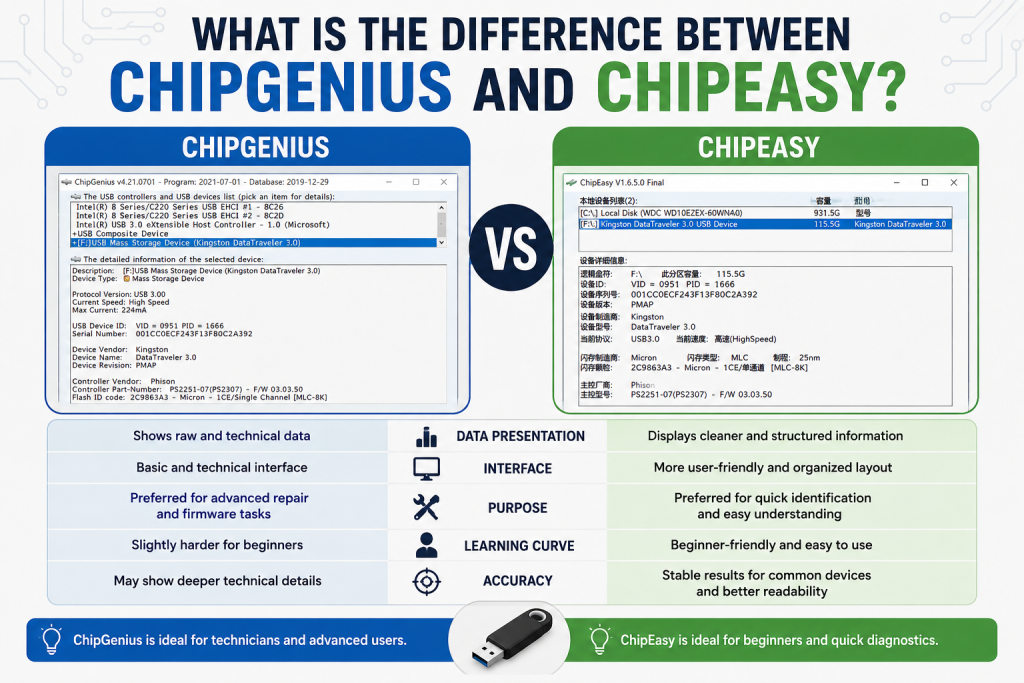
If you have ever tried repairing a USB flash drive or identifying unknown storage devices, you may have come across two popular tools called ChipGenius and ChipEasy. Both of these utilities are widely used for detecting USB controller and flash memory chip information, which helps in troubleshooting, recovery, and firmware-related tasks. At first glance, they may look similar because they serve almost the same purpose, but there are important differences in how they display data, their ease of use, and the level of detail they provide.
Understanding the difference between ChipGenius and ChipEasy is essential for technicians, data recovery specialists, and even beginners who want to fix corrupted USB drives. In this article, we will explore both tools in detail and help you decide which one is better for your specific needs.
Read More: How to Download and Install ChipGenius on Windows
What Is ChipGenius?
ChipGenius is a lightweight utility designed to detect and display detailed information about USB devices and flash memory chips.
Key Features of ChipGenius:
- Detects USB flash drive controller information
- Shows vendor and product IDs (VID & PID)
- Identifies flash memory chip details
- Helps in finding the correct firmware tools for USB repair
- Portable and easy to use (no installation required)
Best Use Case:
ChipGenius is mainly used by technicians and advanced users who want to:
- Repair corrupted USB drives
- Identify unknown USB devices
- Find correct mass production tools for flash memory
What Is ChipEasy?
ChipEasy is another USB identification tool that works similarly but focuses more on user-friendly interface and chip detection accuracy.
Key Features of ChipEasy:
- Provides detailed USB controller and flash chip information
- Often shows more readable and organized data
- Helps identify NAND flash type and controller model
- Lightweight and simple interface
- Useful for beginners as well as professionals
Best Use Case:
ChipEasy is often preferred when users want:
- A simpler way to read USB hardware information
- Better readability of chip details
- Quick diagnostics without complex data interpretation
Key Differences Between ChipGenius and ChipEasy
Although both tools serve a similar purpose, there are some important differences:
Interface and User Experience
- ChipGenius: Basic and technical interface
- ChipEasy: More user-friendly and organized layout
👉 ChipEasy is easier for beginners.
Data Presentation
- ChipGenius: Shows raw and technical data
- ChipEasy: Displays cleaner and more structured information
👉 ChipEasy is better for readability.
Accuracy and Detection
- Both tools are generally reliable
- In some cases, ChipGenius may detect deeper technical details
- ChipEasy may present more stable results for common devices
👉 Results may vary depending on the USB device.
Purpose of Use
- ChipGenius: Preferred for advanced repair and firmware-related tasks
- ChipEasy: Preferred for quick identification and easier understanding
Learning Curve
- ChipGenius: Slightly harder for beginners
- ChipEasy: Beginner-friendly
ChipGenius vs ChipEasy: Which One Should You Use?
Choosing between ChipGenius and ChipEasy depends on your needs:
- If you are a technician or advanced user working with firmware tools → go for ChipGenius
- If you are a beginner or just want quick USB information → go for ChipEasy
In many cases, professionals actually use both tools together to confirm chip information before proceeding with repairs.
Conclusion
Both ChipGenius and ChipEasy are useful tools for identifying USB flash drive and memory chip information, but they serve slightly different purposes. ChipGenius is more suitable for advanced users and technicians who need deep technical details for firmware repair and data recovery tasks. On the other hand, ChipEasy offers a cleaner, simpler, and more user-friendly interface, making it ideal for beginners or those who want quick and easy device identification.