
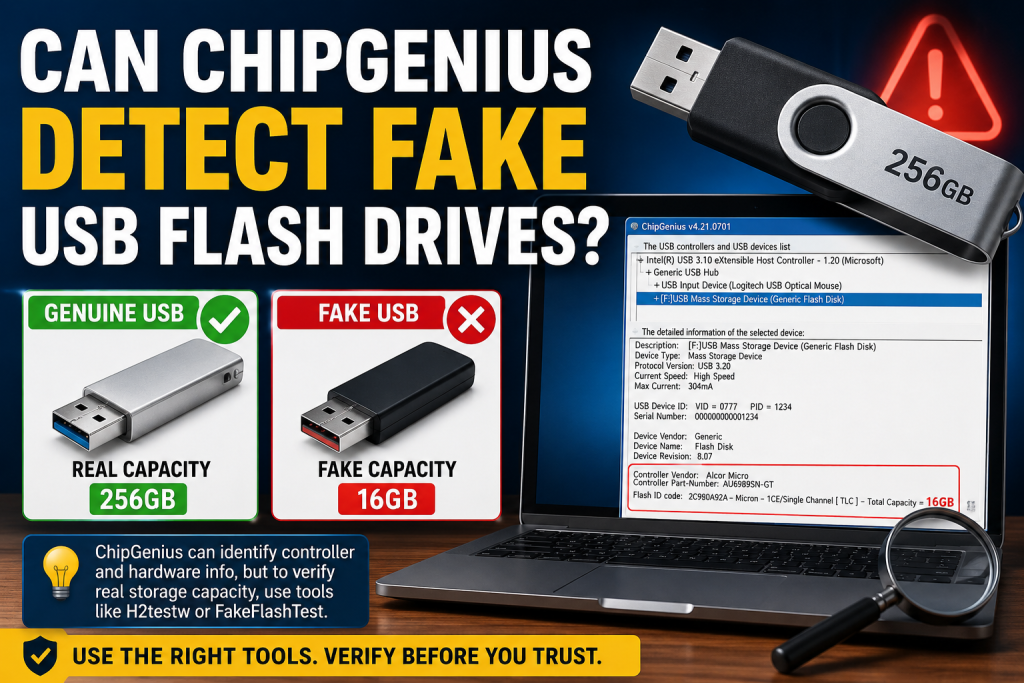
USB flash drives are among the most commonly used storage devices today. Whether you use them for transferring files, creating bootable media, or storing important documents, reliability is essential. Unfortunately, counterfeit USB flash drives have become increasingly common, especially on online marketplaces where fake storage capacities can deceive unsuspecting buyers.
This raises an important question: Can ChipGenius detect fake USB flash drives?
The short answer is yes, ChipGenius can help identify suspicious USB drives, but it is not a complete solution for detecting fake storage capacity. In this article, we’ll explain how ChipGenius works, what it can detect, its limitations, and the best methods for verifying whether your USB flash drive is genuine.
Read More: How to Find VID and PID Information with ChipGenius?
What Is ChipGenius?
ChipGenius is a free Windows utility that provides detailed information about USB storage devices. It reads hardware-level data from the.
USB controller and displays information such as:
- USB controller manufacturer
- Controller model number
- Vendor ID (VID)
- Product ID (PID)
- Firmware details
- Flash memory information
- USB protocol version
Technicians and data recovery professionals often use ChipGenius to identify the exact controller inside a USB drive before performing repairs or firmware updates.
How Fake USB Flash Drives Work
Counterfeit USB drives often contain modified firmware that falsely reports a larger storage capacity than actually exists.
For example:
- A drive advertised as 256GB may physically contain only 16GB of flash memory.
- The controller is programmed to report 256GB to Windows.
- Files written beyond the actual 16GB limit become corrupted or overwritten.
At first glance, the drive appears legitimate because the operating system displays the fake capacity.
Can ChipGenius Detect Fake USB Drives?
Yes, But Only Partially
ChipGenius can reveal important clues that may indicate a counterfeit USB drive.
When you scan a USB flash drive, ChipGenius can show:
- Unknown or suspicious controller models
- Mismatched manufacturer information
- Generic or missing firmware details
- Inconsistent hardware specifications
- Rebranded controllers commonly used in counterfeit devices
If the reported controller information doesn’t match the advertised brand, it may be a warning sign.
For example, if a premium-branded USB drive claims to be manufactured by a well-known company but ChipGenius identifies a low-cost generic controller, further investigation is recommended.
What ChipGenius Cannot Detect
Although ChipGenius is a powerful identification tool, it cannot directly verify the actual usable storage capacity of a USB flash drive.
It cannot:
- Confirm that all reported storage space is real
- Test data integrity across the entire drive
- Detect hidden capacity manipulation with complete accuracy
- Verify read/write reliability
A fake drive may still display normal-looking information inside ChipGenius while reporting an incorrect capacity.
Best Tools to Verify Real USB Capacity
To determine whether a USB flash drive is genuinely providing its advertised storage space, capacity testing tools are more effective.
H2testw
H2testw is one of the most trusted tools for detecting fake flash drives.
It works by:
- Writing test data across the entire drive.
- Reading the data back.
- Verifying whether all sectors function correctly.
If the drive is fake, H2testw will identify the exact amount of usable storage.
FakeFlashTest
FakeFlashTest is another popular utility specifically designed to identify counterfeit USB storage devices.
Benefits include:
- Fast testing modes
- Capacity verification
- Detection of fraudulent storage claims
F3 (Fight Flash Fraud)
F3 is commonly used on Linux and macOS systems and performs similar verification tests.
How to Use ChipGenius to Check a USB Drive
Follow these steps:
Step 1: Download ChipGenius
Download the latest version from a trusted source.
Step 2: Connect Your USB Drive
Insert the USB flash drive into your computer.
Step 3: Launch ChipGenius
Run the application and select the connected USB device.
Step 4: Review Device Information
Pay attention to:
- Controller manufacturer
- Controller model
- Flash memory type
- Vendor information
- Product identifiers
Step 5: Compare Information
Compare the displayed hardware information with the specifications provided by the manufacturer.
Unexpected discrepancies may indicate a counterfeit or modified drive.
Signs Your USB Flash Drive May Be Fake
Watch for these warning signs:
- Extremely low prices compared to market value
- Unbranded packaging
- Storage capacities that seem too good to be true
- Slow transfer speeds
- Frequent file corruption
- Missing manufacturer details
- Suspicious ChipGenius results
If multiple red flags appear, perform a full capacity test immediately.
ChipGenius vs H2testw
| Feature | ChipGenius | H2testw |
|---|---|---|
| Controller Identification | Yes | No |
| Firmware Information | Yes | No |
| Storage Capacity Verification | No | Yes |
| Detect Fake Capacity | Limited | Excellent |
| Data Integrity Testing | No | Yes |
| Best Use | Hardware Analysis | Capacity Verification |
For the most accurate results, use both tools together.
Recommended Verification Process
If you suspect a USB flash drive may be counterfeit, follow this process:
- Run ChipGenius to identify the controller and hardware details.
- Check whether the information matches the advertised product.
- Use H2testw or FakeFlashTest to verify actual storage capacity.
- Monitor for file corruption or abnormal behavior.
- Avoid storing important data until testing is complete.
This combined approach provides the highest level of confidence.
Conclusion
ChipGenius can help detect signs of a fake USB flash drive by revealing controller and firmware information, but it cannot reliably verify the actual storage capacity. While it is an excellent diagnostic tool, it should be used alongside specialized testing software such as H2testw, FakeFlashTest, or F3 for complete verification.
If you’re concerned about a USB drive’s authenticity, ChipGenius is a great first step. However, a full capacity test remains the most reliable way to confirm whether the storage advertised is genuinely available.